Secure travel network setup
A GL.iNet GL-SFT1200 (Opal) travel router configured as a VPN gateway for safer, more consistent routing across multiple devices on public Wi-Fi.
A practical defensive-networking project: a GL.iNet GL-SFT1200 (Opal) travel router set up as a VPN gateway so several devices get a safer, more consistent default route on public Wi-Fi. Devices connect to the travel router instead of trusting the venue network directly, and the router carries their traffic over the tunnel.
Architecture
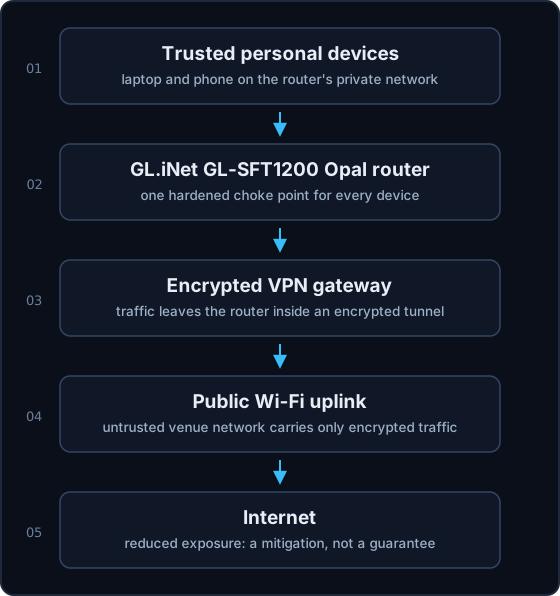 The flow in order: trusted personal devices, then the GL.iNet GL-SFT1200 Opal travel
router, then an encrypted VPN gateway, then the public Wi-Fi uplink, then the internet.
The router provides a trusted local network for the devices and is the only thing that
talks to the untrusted venue Wi-Fi, which only ever sees encrypted traffic. Low-latency
remote access (Parsec) is intentionally kept off this VPN path.
The flow in order: trusted personal devices, then the GL.iNet GL-SFT1200 Opal travel
router, then an encrypted VPN gateway, then the public Wi-Fi uplink, then the internet.
The router provides a trusted local network for the devices and is the only thing that
talks to the untrusted venue Wi-Fi, which only ever sees encrypted traffic. Low-latency
remote access (Parsec) is intentionally kept off this VPN path.
Threat model
- Untrusted networks. Coffee-shop, hotel, and campus Wi-Fi are shared and unverified.
- Device consistency. One hardened choke point is easier to reason about than configuring every device separately.
- Safer defaults. The goal is to reduce casual exposure by default, not to assume the network is friendly.
Concepts practiced
- VPN gateway configuration and routing through a single device.
- DNS handling so lookups follow the tunnel rather than leaking to the local network.
- Basic network segmentation and router hardening.
- General travel-security habits for working from untrusted networks.
Honest limits
This reduces exposure; it does not make public Wi-Fi perfectly safe, and it is not treated as if it does. No credentials, private IP addresses, tunnel keys, or screenshots with sensitive data appear here. It is a defensive networking exercise that supports security-aware travel, nothing more.